• Home
  • News
    • UP 200
    • Local
    • Lansing Bureau
    • Washington D.C. Bureau
    • National
    • Insights
    • Watch 19 News Live
    • CBS News Live
    • Report News
  • Weather
    • Forecast + Conditions
    • Current Alerts
    • Interactive Radar
    • Cameras
    • Share Photos/Videos
    • Closings and Delays
  • Sports
  • Features
    • Medical Minute
    • Life in the 906
    • The Yooper Goddess
WZMQ 19 News | CBS | MeTV Marquette
Light Snow

Marquette
Light Snow 27°

Cloudy

Escanaba
Cloudy 32°

Cloudy

Houghton
Cloudy 28°

Cloudy

Iron Mountain
Cloudy 30°

Watch
No Result
View All Result
  • Home
  • News
    • UP 200
    • Local
    • Lansing Bureau
    • Washington D.C. Bureau
    • National
    • Insights
    • Watch 19 News Live
    • CBS News Live
    • Report News
  • Weather
    • Forecast + Conditions
    • Current Alerts
    • Interactive Radar
    • Cameras
    • Share Photos/Videos
    • Closings and Delays
  • Sports
  • Features
    • Medical Minute
    • Life in the 906
    • The Yooper Goddess
WZMQ 19 News | CBS | MeTV Marquette
No Result
View All Result
WZMQ 19 News | CBS | MeTV Marquette
No Result
View All Result

Experts say iOS 17 “NameDrop” feature is not a cause for concern

by Scott Minshall
November 29, 2023
A A

MARQUETTE, Mich. (WZMQ) – A new iPhone feature has left some feeling uneasy about the potential sharing of personal information.

The new iOS 17 update expanded upon the iphones “Airdrop” feature which allows users to wirelessly transfer photos and videos. The new “NameDrop” makes it possible for iPhone users to pass contact information, which could include things like someone’s name and address, by just being near each other.

The update has caused fear’s about safety and security from iPhone users but according to tech experts the feature is nothing to be concerned about.

“How it works is both iPhones have to be next to each other, but both users have to grant that permission, so a lot of the fears of someone just walking by you and getting your contact just aren’t possible you have to grant that permission. At any time during that if any of the two iphones are taken away from each other then the transaction ceases,” said Justin Burford, the VP of Marketing for Team Wireless.

According to Burford the feature can be helpful at business meetings and in professional settings for exchanging contact information as more people move towards paperless transactions. 

If you wish to turn off the name drop feature it can be done in the settings app on your iPhone. Just follow these steps;
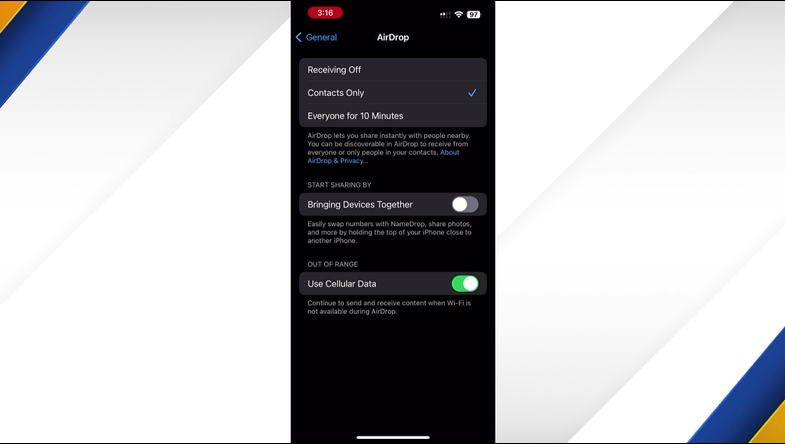
  • – Go to iPhones settings.
  • – Click on  “General,” then “Airdrop.”
  • – Turn off NameDrop, toggle the “Bringing Devices together” sharing option button to off.

More

The UP200 is back. both the midnight run and the up200 got off to a great start.
News

City of Marquette announces street closures for UP200 races

February 10, 2026
News

Marquette City Commission approves MDOT grant to allow for Wilson Street overpass

February 9, 2026
News

MSU researchers study impacts of state-funded after-school programs as UP participation grows

February 9, 2026
News

Schoolcraft Memorial Hospital receives five-star rating from National Rural Rating System

February 9, 2026
News

Police investigating fatal Chocolay Township snowmobile crash

February 9, 2026
News

2 arrested on multiple drug charges after months-long investigation

February 9, 2026
Next Post

Gladstone Area Schools bus driver gets in physical altercation with student

In Personal and Passionate Floor Speech, Schumer Warns Against Rise in Antisemitism

  • Home
  • News
  • Weather
  • Sports
  • Features
  • Events
  • Programming
  • Station
WZMQ CBS | 19 News

© 2026 WZMQ, LLC | FCC Public File | EEO Report

No Result
View All Result
  • Home
  • News
    • UP 200
    • Local
    • Lansing Bureau
    • Washington D.C. Bureau
    • National
    • Insights
    • Watch 19 News Live
    • CBS News Live
    • Report News
  • Weather
    • Forecast + Conditions
    • Current Alerts
    • Interactive Radar
    • Cameras
    • Share Photos/Videos
    • Closings and Delays
  • Sports
  • Features
    • Medical Minute
    • Life in the 906
    • The Yooper Goddess
  • Events
  • Programming
    • Programming Guide
    • CBS
    • MeTV
    • Start TV
    • Heroes & Icons
    • Court TV
    • ION
  • Station
    • About Us
    • Community Involvement
    • Mobile App
    • Meet the Team
    • Contact
    • Careers
    • Advertising
    • Request Copy of Story
    • FCC Public File
    • EEO Report
No Result
View All Result
  • Home
  • News
    • UP 200
    • Local
    • Lansing Bureau
    • Washington D.C. Bureau
    • National
    • Insights
    • Watch 19 News Live
    • CBS News Live
    • Report News
  • Weather
    • Forecast + Conditions
    • Current Alerts
    • Interactive Radar
    • Cameras
    • Share Photos/Videos
    • Closings and Delays
  • Sports
  • Features
    • Medical Minute
    • Life in the 906
    • The Yooper Goddess
  • Events
  • Programming
    • Programming Guide
    • CBS
    • MeTV
    • Start TV
    • Heroes & Icons
    • Court TV
    • ION
  • Station
    • About Us
    • Community Involvement
    • Mobile App
    • Meet the Team
    • Contact
    • Careers
    • Advertising
    • Request Copy of Story
    • FCC Public File
    • EEO Report
This website uses cookies. By continuing to use this website you are giving consent to cookies being used. Visit our privacy policy.